
Timeouts
Timeouts are essential in distributed software systems, but they are not what you think they are.

Imagine a busy restaurant. Orders are coming in fast, and the kitchen is working hard. Now, picture what happens if one chef gets stuck on a particularly complex dish, holding up all subsequent orders. Soon, the entire system grinds to a halt, with angry customers and cold food. This, in a nutshell, is the “snowball effect” in a software system, and it’s a nightmare for reliability.
In the world of network programming and web services, especially with synchronous requests, a similar scenario can unfold rapidly. A single slow or unresponsive dependency can bring down an entire chain of services, leading to widespread outages. This is the reason why socket timeouts exist.
What is a Timeout?
A network socket is one endpoint of a two-way communication link between two programs running on a network. Think of it as a physical door. For a conversation to happen, both the client (you) and the server need to have their doors open and connected by a hallway.
Opening the Socket: Your application asks the OS for a socket.
The Connection (TCP Handshake): Your socket sends a “Hello” (SYN), the server responds “Hello back” (SYN-ACK), and you confirm (ACK).
Data Exchange: Once the hallway is built, data flows in packets.
If the “hallway” gets blocked or the server at the other end falls asleep, your socket will sit there waiting forever unless you configure timeouts.
There are three main layers you need to care about:
1. Connection Timeout
It limits how long you’re willing to wait for the server to acknowledge your initial request to connect.
If the server is down or the IP is wrong, you don’t want your app to hang for 2 minutes (the OS default) before telling the user “Service Unavailable.”
2. Socket Timeout (Read/Write Timeout)
Once the connection is established, the socket timeout kicks in.
It monitors the gap between packets. If you are expecting data and nothing arrives for, say, 5 seconds, the socket is “cut.”
This is not a timer for the total request duration. As long as the server sends 1 byte every few seconds, a socket timeout will never trigger.
3. HTTP/Application Timeout
It sets a hard limit on the entire transaction. “I don’t care if the connection is fast or slow; if I don’t have the full response in 30 seconds, I’m out.”
Why You Must Configure Them (Avoiding the Snowball)
In high-load systems, the default timeout is usually your enemy. If your server handles 100 synchronous requests at a time and starts calling a slow third-party API with a 60-second default timeout, here is what happens:
The Stall: 100 users hit your server. Your server calls the slow API.
The Queue: Those 100 threads are now “busy” doing nothing but waiting.
The Crash: New users arrive, but there are no threads left to help them. Your server is now “down” simply because it was too patient.
By setting a “Connection Timeout” of 2s and a “Read Timeout” of 5s, you fail fast. You release that thread back to the pool so it can serve the next customer, even if it has to say, “Sorry, that specific service is slow right now.”
Always set your timeouts shorter than the timeout of the service calling you. If your user’s browser gives up after 10 seconds, there is no point in your server waiting 30 seconds for a database.
The Dangers of Indefinite Waiting: The Snowball Effect
Consider a service architecture where service A calls service B, which in turn calls service C. If service C becomes slow or unresponsive (perhaps due to a database issue or heavy load), without timeouts, service B will wait indefinitely for service C to respond. This means service B’s resources (threads, connections) will be tied up.
As more requests hit service A, more requests go to service B, and more threads in service B get stuck waiting for service C. Eventually, service B runs out of available threads or connections, becoming unresponsive itself. This then causes service A to get stuck, leading to a cascading failure across your entire system. This is the snowball effect: a localized problem growing exponentially until it engulfs everything.
How Timeouts Halt the Snowball
Timeouts are your primary defense against this destructive pattern. By implementing sensible timeouts:
Resource Liberation: When a timeout occurs, the resources (threads, connections, memory) tied up by the stalled request are immediately released. This prevents your service from exhausting its capacity waiting for a dependency that isn’t performing.
Early Failure Detection: Timeouts act as an early warning system. Instead of hanging indefinitely, your application quickly identifies that a dependency is struggling. This allows for faster error handling, fallback mechanisms, or circuit breaking.
Preventing Cascading Failures: Because resources are freed, your service can continue to process other, healthy requests, even if one dependency is having issues. This prevents the problem from spreading upstream to other services.
Graceful Degradation: With timeouts, you can design your system for graceful degradation. If a non-critical dependency times out, you might return a cached response, a default value, or even a partial response, rather than failing the entire request.
But configuring wrong timeouts mean also big issues.
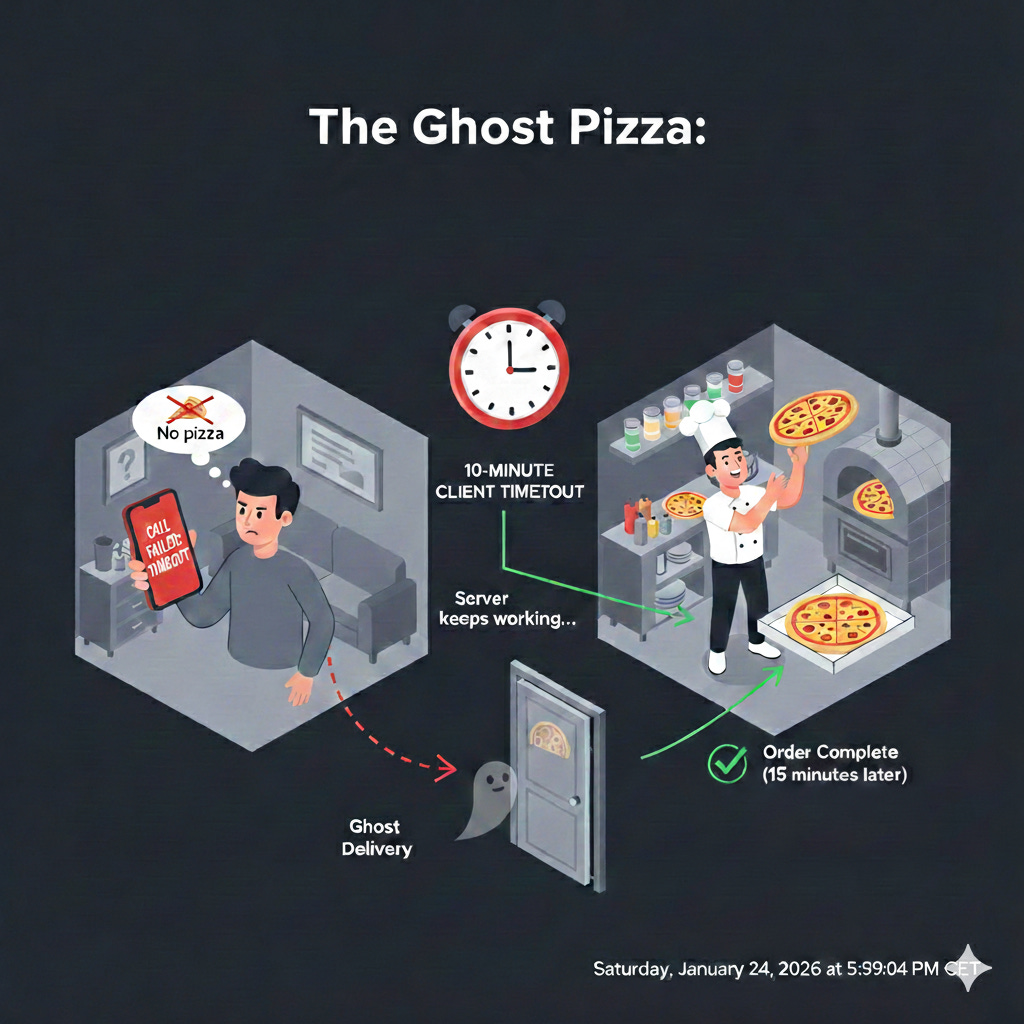
The “Ghost Operation” Problem
This is one of the most dangerous traps in backend development. When a client (like your browser or a mobile app) triggers a timeout, it is essentially saying, “I’m tired of waiting, I’m hanging up.” However, the server does not care that the client hung up. In many cases, the server keeps working until it finishes.
Think of it like calling a pizza place. You wait on hold for 10 minutes, get frustrated, and hang up.
The Client’s View: “I don’t have a pizza. The order failed.”
The Server’s View: The chef is already tossing the dough. They don’t know you hung up. 20 minutes later, a pizza shows up at your door that you didn’t think was coming.
Why This Happens
In a standard synchronous request, the communication looks like this:
Client sends a command: “Transfer $100 from Account A to B.”
Server starts a database transaction.
Client Timeout hits at 5 seconds. The client throws an error and tells the user “Transaction failed.”
Server continues to work for 2 more seconds, successfully commits the database change, and sends a “Success” message.
The Result: The “Success” message hits a closed door. The money is moved, but the user thinks it isn’t.
Clients reaction to timeouts
If the client sees a “Timeout Error,” what is the first thing they do? They click the button or retry the request again.
Now you have:
Request #1: Still running on the server, consuming CPU and database locks.
Request #2: A new request consuming another thread and another database lock.
This accelerates the Snowball Effect. Your server was already slow, and now your users are unintentionally DDoS-ing you by retrying operations that are actually succeeding behind the scenes.
Now think about how many retries do you have in your synchronous system when any kind of error happens calling a server, including timeouts. Retries are usually more a problem than a solution, if something has timed out 10 milliseconds ago why is going to be in time now?.
Automatic retries just feed the snowball effect.
How to Fix the “Ghost” Success
To handle this, developers use two main strategies:
Idempotency Keys: The client sends a unique ID (e.g.,
req_12345) with the request. If the server sees the same ID again, it knows not to run the operation twice. It just says, “Oh, I already did that, here is the result.”Propagation (Context Cancellation): Modern languages (like Go with
contextor Node.js withAbortSignal) allow the server to “listen” for the client hanging up. If the socket closes, the server can immediately stop the database query to save resources.
Never assume a 408 Request Timeout, a 504 Gateway Timeout or any timeout exception in your code means “nothing happened.” In the world of distributed systems, a timeout is an Unknown State, not a failure state.
Setting Sensible Timeouts
There’s no one-size-fits-all answer for timeout values. They depend heavily on the expected latency of the operation, the network conditions, and the criticality of the dependency.
Too Short: Can lead to premature errors, especially under normal load fluctuations.
Too Long: Diminishes their effectiveness in preventing resource exhaustion and the snowball effect.
It’s often a balance and requires careful monitoring and tuning. Consider using different timeouts for different types of operations (e.g., a shorter timeout for a read-heavy, low-latency API, and a longer one for a complex, analytical query).
To find the perfect balance, you need to stop guessing and start looking at your data.
Connection Timeout: This should be short. If your server can’t establish a TCP handshake within 1 to 2 seconds, the network is either heavily congested or the service is down. There’s no point in waiting longer just to be told the “door is locked.”
Read/Socket Timeout: This is the “silence” timer. Look at your P999 latency (the time it takes for 99.9% of your successful requests to complete). Set your socket timeout slightly above this. If your P999 is 500ms, a 1-second timeout is a safe bet.
Application/HTTP Timeout: It should be based on human patience. If a user is likely to refresh their browser after 10 seconds, your server should give up at 9 seconds.
Good practices related to timeouts
Fail Fast, but Fail Gracefully: Instead of a generic “Error,” use your timeout to trigger a fallback. If a recommendation service times out, show “Popular Items” instead of a broken page.
The “Jittery” Retry: If a request fails due to a short timeout, never let the client retry immediately. Use Exponential Backoff with Jitter. This ensures that thousands of clients don’t hit your server at the exact same millisecond after a timeout.
The Circuit Breaker: Circuit Breakers are a shut-off valve. If your timeouts are triggering constantly, the “Circuit” should open, automatically failing all requests for a few seconds to give the backend breathing room to recover. Too many timeouts mean to open the circuit.
In the realm of distributed systems and high-traffic applications, timeouts are not just a good practice; they are a fundamental building block of resilient architecture. They provide a crucial line of defense against the unpredictable nature of networks and external dependencies, ensuring that a hiccup in one part of your system doesn’t turn into a catastrophic avalanche.
But timeouts are not signals that the underlying service didn’t do what you ask to do, they just mean “I’m tired of waiting”.